Users Tab
Note
The red badge next to the Users TOC Table of Content. The left pane in the Web UI. presents the number of blocked usernames. A blocked username is highlighted in the listing. To unblock a user, reset their password.
Partition SOSecurity officer - UKC partition administrator role. ˃ Users
→ presents the following:
- The Create button to Add User.
- Table of Users.
Table of Users
Each row presents the following attributes:
- Name
- Role - the assigned role or none.
- User Groups - membership in user groups or none.
- AuthenticationProcess used to achieve sufficient confidence in the binding between the Entity and the presented Identity. - (Standard, OIDCOpenID Connect is identity layer on top of the OAuth 2.0 protocol, LDAPLightweight Directory Access Protocol).
- Login failures - a counter of consecutive rejected login attempts.
- Created - user creation date.
- [
 ] see Commands.
Note
Usernames and roles are not case sensitive and are presented in lowercase letters.
Add User
Partition SOSecurity officer - UKC partition administrator role. ˃ Users ˃ Create
→ The New User dialog appears:
- Name - enter the name:
- CORE or OIDCOpenID Connect is identity layer on top of the OAuth 2.0 protocol authenticate the user - see
Username Characters.
- LDAPLightweight Directory Access Protocol authenticates the user - enter the name as it is set in the LDAPLightweight Directory Access Protocol directory.
- CORE or OIDC
- Role - Click ▼
→ The list of the defined Roles appears. - AuthenticationProcess used to achieve sufficient confidence in the binding between the Entity and the presented Identity. method - Click ▼
→ List of appears. Select the resource that will authenticate the user:- Standard - authenticated by CORE .
- OpenID Connect (OIDCOpenID Connect is identity layer on top of the OAuth 2.0 protocol) - authenticated by the OIDCOpenID Connect is identity layer on top of the OAuth 2.0 protocol Provider.
- LDAPLightweight Directory Access Protocol - authenticated by the LDAPprovider.
- Password - appears if the AuthenticationProcess used to achieve sufficient confidence in the binding between the Entity and the presented Identity. method is "Standard" or "LDAPLightweight Directory Access Protocol". Enter the password. See Password Requirements.
Select the role or skip the assignment.
Commands
Partition SOSecurity officer - UKC partition administrator role. ˃ Users ˃ select User ˃ []
→ The list of commands appears.
Commands that all users share are:
The following commands are specific to the authentication type:
- Reset Password - applicable to users that maintain their credentials in CORE.
- Users Tab - applicable to users that already enrolled into TOTPTime-based One Time Password-based 2FATwo-factor authentication - Authentication method that requires both something a user has (for example, a certificate) and something the user knows (for example, a password).
- Edit SSO-user - applicable to users that delegate their authentication to OpenID Connect provider.
Show Info
Partition SOSecurity officer - UKC partition administrator role. ˃ Users ˃ select User ˃ []˃ Show Info
→ The <username> info appears. It includes:
- Name
- Role - can be left unassigned.
- Partition
- User Groups - can be left unassigned.
- Created at - date and time when a username was added.
- Last updated at - date and time of the last change.
- Last activity at - last login date and time.
- AuthenticationProcess used to achieve sufficient confidence in the binding between the Entity and the presented Identity.
- For users authenticated by CORE:
- Failed logins - the number of rejected login attempts. A successful login clears this counter.
- Login locked - the status of the login-lock due to excessive rejected login attempts.
- Password last updated at - date and time of the last password change.
- For users authenticated by OIDCOpenID Connect is identity layer on top of the OAuth 2.0 protocol:
- List of Aliases grouped by OIDCOpenID Connect is identity layer on top of the OAuth 2.0 protocol provider.
- List of Aliases grouped by OIDC
Show Permissions
Partition SOSecurity officer - UKC partition administrator role. ˃ Users ˃ select User ˃ []˃ Show Permissions
→ The Permissions table appears. It details the Role setting of the user by presenting:
- Group - the name of a key group. See Membership in Key-Groups.
- Operations - list of operations permitted for the key group. See Summary of ACL Controlled Operations.
Note
You cannot directly tweak the permissions of an individual user. To modify the user's permissions, you have two options:
- Create a new role with the required permissions and reassign the user to this role. See Roles Tab.
- Modify the current role. See Edit.
Change Role
Notes
- This feature is not applicable to SOs.
- Changing the user's role to SOSecurity officer - UKC partition administrator role. is irreversible.To undo the change, delete and recreate the user.
Partition SOSecurity officer - UKC partition administrator role. ˃ Users ˃ select User ˃ []˃ Change role
→ The Change role dialog appears:
- Choose Role Click ▼
→ The list of the defined roles or an option to clear the role appears. - Select the required role or clear the role as shown in this capture
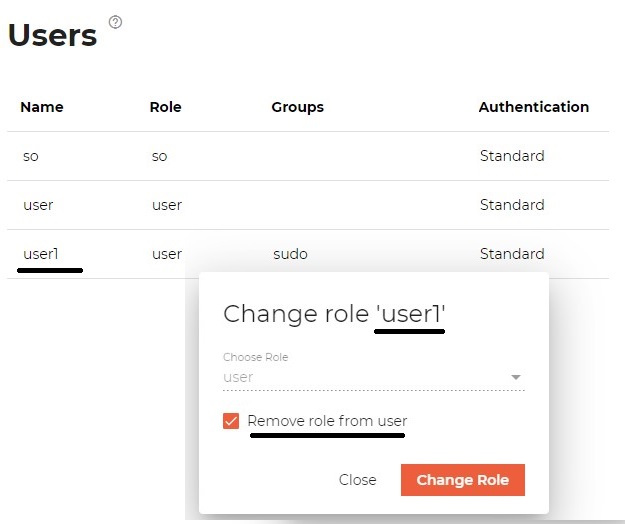
- Click Change Role to confirm.
Notes:
- To check permissions granted to a user by its role, use Show Info.
- Initially, the default
useris assigned to the default role. You can change its role as needed or add to a user group that provides this role to all its members.- To create a new role, see Roles Tab.
- To create a user group, see Add User Group.
Note
This command is logged in the CORE audit log (see Audit Logs) as DyChangeUserPartitionRole operation.
Add User to User Group
To add (or delete ) a user to a user group, see Commands.
Delete
Partition SOSecurity officer - UKC partition administrator role. ˃ Users ˃ select User ˃ []˃ Delete
→ The Delete user dialog appears.
Notes:
- This command does not apply to the default users of the partition (user-names: SOSecurity officer - UKC partition administrator role. and USER).
- This operation deletes the selected user from the partition's database only. In particular, no change is done in the LDAP-DSPLDAP directory service provider directory or OIDCOpenID Connect is identity layer on top of the OAuth 2.0 protocol provider.
Note
This command is logged in the CORE audit log (see Audit Logs) as DyDestroy operation.
Reset Password
Applicable to users that maintain their credentials in CORE.
Partition SOSecurity officer - UKC partition administrator role. ˃ Users ˃ select User ˃ []˃ Reset Password
→ The Reset password dialog appears
- New password - enter the password. See Password Requirements.
Note
This command is logged in the CORE audit log (see Audit Logs) as DyUpdateUserPassword operation.
Reset 2-Factor Authentication
Applicable to users that already enrolled in the TOTPTime-based One Time Password-based 2FATwo-factor authentication - Authentication method that requires both something a user has (for example, a certificate) and something the user knows (for example, a password) (is2FAEnrolled: true). Once this setting is reset to false, the user, on the her next login, will have to re-enroll in the TOTPTime-based One Time Password-based 2FATwo-factor authentication - Authentication method that requires both something a user has (for example, a certificate) and something the user knows (for example, a password). See UI.
Edit OpenID aliases
Applicable to users that OpenID Providers authenticate.